
Synorive
Local-first semantic search for every file you own — plus a fact-checked web researcher.
Search your documents, source code, PDFs, images and videos by meaning, not by filename. Then search the open web across many engines, hunt for counter-evidence, and get a briefing where every single line is a verbatim quote with its source.
Runs fully offline. Your files never leave your machine. Ships 26 MCP tools for Claude Code.
English · 简体中文 · Français · Español · Русский · العربية
⬇️ Download
No Python installation required. The interpreter and every engine dependency ship inside the installer, so a fresh machine with no Python, no pip access and no internet still starts up.
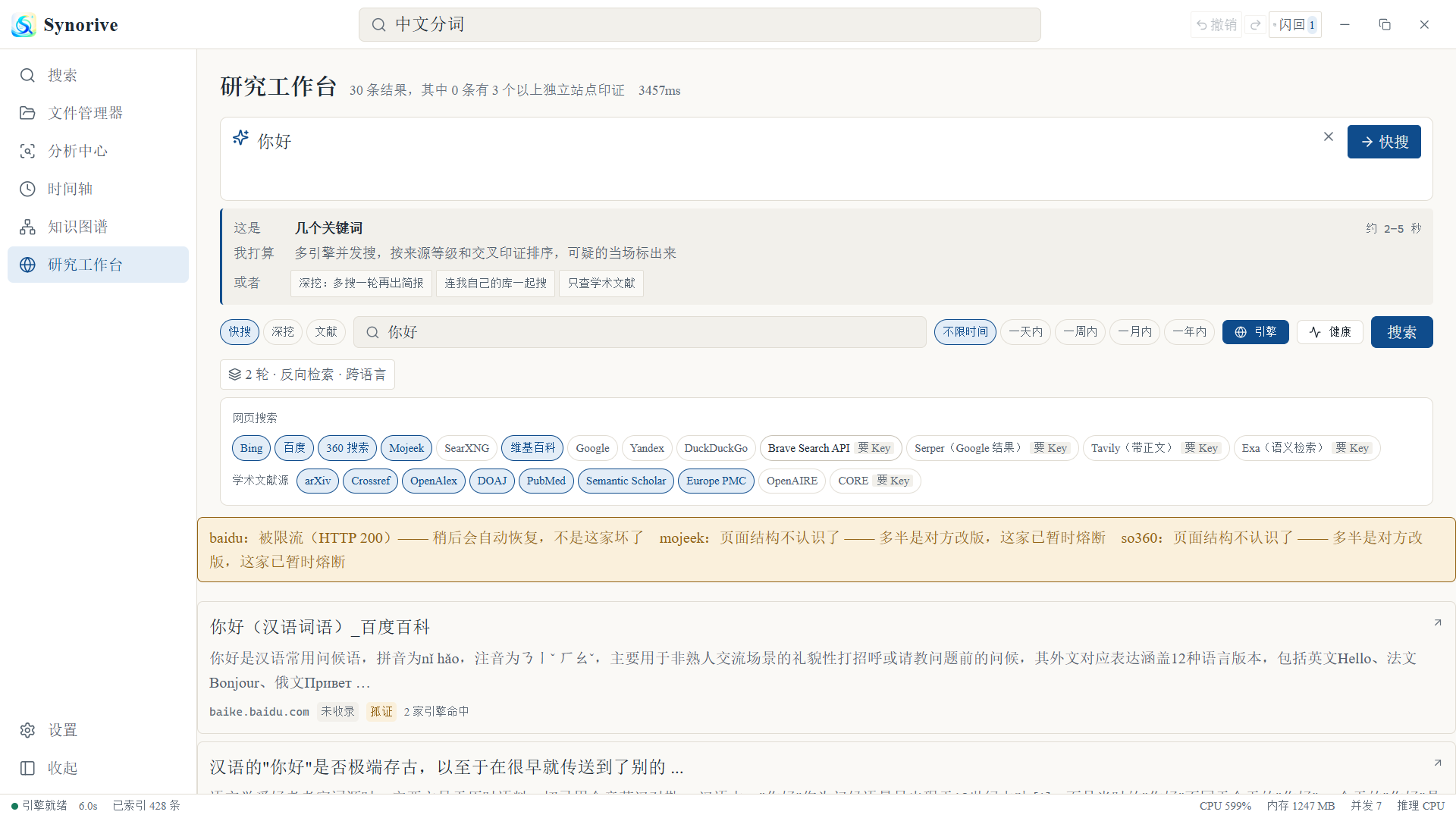
The research workbench: multi-engine search, per-source trust ranking, and an excluded-results drawer that always tells you why something was filtered out. Dark theme: screenshot
What it does
Keywords: local semantic search · offline AI search engine · multimodal RAG · personal knowledge base · document search · vector search · hybrid search · fact checking · misinformation detection · MCP server · Claude Code · SQLite FTS5 · sqlite-vec · HNSW · OCR · video search · Chinese NLP · Electron desktop app · privacy-first · self-hosted · offline RAG · desktop search · question answering with citations · extract-only · no hallucination · reranking · embeddings · local LLM alternative · no API key · air-gapped search
Why another search tool?
Most "search your files" tools stop at keyword matching, and most "AI research" tools hand you a fluent summary you cannot verify. Synorive refuses both:
- Retrieval is measured, not claimed. Every performance number below was benchmarked on real data — including the two that did not reach their targets. They are listed with the reason instead of being quietly dropped.
- Nothing is silently discarded. Results filtered out as low quality go into an "excluded" drawer with the reason, one click to bring them back.
- It never tells you something is false. It finds who disputes a claim and shows you both sides. Judging truth is not a capability it has, and pretending otherwise would be the most dangerous thing it could do.
What works today
Phases 1–3, 5 and 8 are complete. The application is genuinely usable right now.
⚠️ If you installed 0.1.9 or 0.1.10, please update
Those two builds shipped a Python runtime that was missing
click, a hard dependency of uvicorn. The engine could not start at all — the app opened, the tray icon appeared, and the engine restarted in a loop forever. On top of that, enabling LAN pairing switched the engine to HTTPS while every client still spoke HTTP, so the desktop app, the MCP tools and the CLI all lost the engine.Both are fixed in 0.1.11, and the packaging self-check now runs with the same
sys.paththe shipped app uses — which is the only reason the missing package was invisible before. The full story is in the 0.1.11 release notes.
Searching your own files
- Drop in a folder mixing documents, code, images and video → indexed concurrently in the background, the UI never freezes
- Semantic search over documents in Chinese and English — describe the content, no need to remember the filename
- Query syntax straight in the search box:
type:pdf date:last7days -draft "exact phrase" - Search text inside images (OCR, measured at 100% character coverage)
- Find similar images from one image, or find which video a frame came from and at what second
- Search a spoken line and jump straight to 3 m 24 s of the video
- Papers indexed by section (Abstract / Method / Results); hits are labelled
page 2 · Background - Ask a PDF "what questions can you answer?" and click a question to expand the source passage
Searching the web and checking it
- Many engines concurrently (cn.bing / Baidu / 360 / Mojeek / Wikipedia); with a self-hosted SearXNG, Google and DuckDuckGo work too
- Deep research reads the first round before deciding what to ask next, then searches again
- A Chinese query automatically gets an English variant, routed to the engines with better English coverage — primary sources are usually in English
- Actively reverse-searches for "debunked / disputed / retracted / controversy" and puts the counter-evidence in front of you
- Traces a claim back to its earliest source; a dozen sites publishing the same story within two days gets flagged as a syndication burst
- A cited paper that has been retracted is flagged in red (via OpenAlex)
- Five academic sources merged by DOI, with citation counts and PDF links
Using it from Claude Code
After claude mcp add synorive, Claude Code can search your library, verify a claim, and compare
what you have against what the web says — in the same answer.
How-to guides
- Desktop, including every keyboard shortcut —
docs/操作指南-电脑版.md - Android phone / tablet, step by step —
docs/操作指南-安卓版.md
The full technical design and the 76-item feature menu live in
docs/00-技术方案.md. Every performance target, how it counts as measured,
and which ones are still untested, are declared in code at
engine/synorive/metrics.py; the benchmark scripts are in
engine/tests/ (bench_g_series / bench_research / bench_ingest_stages).
Benchmarks (measured, not estimated)
⚠️ Ingest throughput is bound by this machine (i5-1155G7, no discrete GPU). Stage-by-stage timing shows embedding alone is 97.7% of the cost; the other five stages together are 2.3%. Going faster from here means a quantised model or a GPU, not more tuning.
⚠️ The deep-research P95 dropped from 23.79 s to 8.29 s, but the cost was that 20 of 20 runs skipped the second follow-up round. The number and its price have to be read together.
See the how field of A6/A7 in engine/synorive/metrics.py — the
target column there says "⚠️ to be re-set" instead of a number, and that is deliberate: a target
everyone knows is unreachable is worse than admitting it has not been set.
Getting started
One-time setup
# 1. Node dependencies (Node ≥20)
npm install

# 2. Generate the font subset (6 MB, not in the repo, must be generated once)
python scripts/build_fonts.py

# 3. Generate icons (already committed; only needed if you change the source image)
python scripts/build_icons.py

# 4. Python engine environment (Python ≥3.11)
py -3.13 -m venv engine/.venv
engine/.venv/Scripts/python.exe -m pip install -e engine
Develop
npm run dev # Electron + Vite with HMR; the engine starts itself
Build
npm run build            # all workspaces
npm run build:desktop    # desktop only
npm run pack:win         # Windows installer + portable
Release and auto-update
Desktop and Android both check for updates against this repository's GitHub Releases.
npm run version:check      # are all four version numbers in sync?
npm run version:set 0.1.11  # change all four at once — never edit them by hand
npm run android:keystore   # first time only: generate the Android release keystore (kept outside the repo)
npm run release            # build both artifacts, do NOT upload
npm run release:publish    # build and create a GitHub Release (requires gh to be logged in)
There are four ways to break the update chain that produce no error at all.
scripts/release.mjs blocks each one:
Security boundary of the update channel — stated plainly rather than glossed over:
Closing the desktop gap has exactly one path: buy a code-signing certificate and set
publisherName in electron-builder.yml. Until then, do not market this as "secure updates".
Two known limitations, both by design rather than bugs:
- The portable exe cannot auto-update. A single-file self-extracting build runs from a temp directory and cannot replace the copy of itself that is currently running. The app says so explicitly and links to the download page, instead of erroring and making you retry.
- Android requires manual install confirmation. Distribution outside an app store can only invoke the system installer, which asks for "allow installing unknown apps" the first time. The app detects that permission and takes you straight to the right settings page.
Running the engine on its own (debugging, CLI, MCP)
engine/.venv/Scripts/python.exe -m synorive.main --port 8731 --data-dir ./data
# API docs at http://127.0.0.1:8731/docs
Connecting to Claude Code
npm run build --workspace=@aevorine/synorive-mcp
node scripts/install-claude-integration.mjs
Open a fresh Claude Code session afterwards and ask "did I save anything about X?" — retrieval fires automatically.
The 26 tools:
- Local library —
search/ingest/analyze/get_content/similar/timeline/graph/status/questions - Web —
web_search/research/scholar/read_url/web_engines/verify/unified_search - Reverse search —
reverse_image(where else does this picture appear online),reverse_video(trace a clip back to its original source by matching several keyframes) - Literature —
scholar_review(thematic review, extract-only),scholar_table(one metric across many papers),citations(co-citation to find the foundational papers),harvest(bulk-fetch open-access full text into the library, dry-run by default) - Verification and memory —
check_numbers(check every figure against the source text),memory(what did I already look up on this topic?) - Local media —
compare(what differs between two files),chapters(chapter list for a long video)
Everything returned to Claude carries a trust breakdown and a source, and the tool descriptions state the limits of what the tool can do ("cannot judge whether a statement is factually true", "verbatim extraction is not paraphrase", "counter-evidence exists ≠ the original claim is false"). Without that, Claude will treat a content farm and an official spec as equally authoritative and relay both with the same confident tone.
The engine address is auto-discovered from data/engine.json: if the desktop app is running, the
MCP server connects to the same engine; if not, it starts its own. SYNORIVE_ENGINE_URL overrides.
Making Google and DuckDuckGo work (optional, strongly recommended)
Measured in August 2026: Google now requires JavaScript (plain HTTP only returns a redirect page), DuckDuckGo's html endpoint became a JS landing page, Yandex serves a captcha, and all seven public SearXNG instances returned 429/403. In practice there is exactly one free path left to those engines: run your own SearXNG.
node scripts/setup-searxng.mjs            # show what it intends to do (dry run, changes nothing)
node scripts/setup-searxng.mjs --apply    # actually install it (needs Docker)
node scripts/setup-searxng.mjs --status   # is it still alive?
The engine auto-discovers and enables it on cold start — no settings toggle to find. Measured
after installing: google cse contributed 20 results on its own and DuckDuckGo 10, where both
return zero when queried directly.
Design decisions that are not obvious
- Web search and cloud inference are two switches, not one. Web search leaks what you are asking; cloud inference leaks what you already have. Those are different risks, so collapsing them into a single "privacy mode" would let you turn off the one you cared about while the other stays on.
- The clipboard image overlay never goes to the network — even with web peeking enabled. Sending text is one sentence; sending a screenshot is an image that could contain anything.
- Filtered results are folded, not deleted. The same article found by five engines and reposted by three sites is eight results but one thing. Folding it and recording "5 engines, 3 sites" keeps the number that cross-verification needs; deleting it throws that away.
- Rate-limited ≠ broken. A search engine that returns a captcha is not a broken parser. They are counted separately, because "slow down" and "this adapter is dead" need opposite responses.
- Benchmarks that missed their target stay in the table. Two rows above are marked ⚠️ rather than removed.
License
AGPL-3.0-or-later. If you run a modified version as a network service, you must publish your modifications.